Please disable your ad blocker.
The only ads on this site are discreet (sidebar on desktop, below the content on mobile).They do not interfere with reading and may even offer you benefits (discounts, free months…).
Web customization FAQ
Welcome to the FAQ page dedicated to UserScripts and UserStyles. Here, you will find answers to the most common questions regarding the installation, customization, and management of my UserScripts and UserStyles. Whether you are new to this field or need assistance, this page is here to help!
Table of Contents
- What is the difference between a UserScript and a UserStyle?
- Can I use Violentmonkey and Stylus at the same time on the same website?
- Are UserScripts and UserStyles free?
- I like your creations, how can I support you?
- I would like a UserScript and/or UserStyle to be created for a website. Can I request one?
- What payment methods can I use for a creation request?
- How do I install a UserScript?
- How do I install a UserStyle?
- How do I access UserScript customization options?
- How do I access UserStyle customization options?
- Can I modify a UserScript and UserStyle?
- I can’t find my issue in the FAQ. What can I do?
What is the difference between a UserScript and a UserStyle?
UserScript: Adds active features to a website.
Concrete examples:
- A “Download all images” button on a gallery website.
- A script that automatically displays hidden answers on a forum.
- A tool to automatically fill repetitive forms.
Recommended tool: Violentmonkey [ violentmonkey.github.io ] because it is compatible with most browsers, free, and open-source [ en.wikipedia.org ].
UserStyle: Modifies the visual appearance of a website.
Concrete examples:
- A dark theme for Twitter or YouTube.
- Larger fonts and buttons for better readability.
- Reorganizing page elements (e.g. moving the sidebar).
Recommended tool: Stylus [ add0n.com ] because it is the most compatible and powerful, free, and open-source [ en.wikipedia.org ].
In summary:
- A UserScript = adds actions (like a plugin).
- A UserStyle = changes the design (like a theme).
Can I use Violentmonkey and Stylus at the same time on the same website?
Yes, you can use Violentmonkey (for UserScripts) and Stylus (for UserStyles) at the same time in the same browser and on the same website. They are designed to be complementary and generally cause no conflicts.
Special cases to be aware of:
- Some UserScripts include CSS code to modify a website’s appearance. In that case, a UserStyle applied via Stylus may conflict with the UserScript’s CSS.
Example: If a UserScript and a UserStyle both modify a button’s color, the one loaded last will override the other. - To avoid conflicts, you can:
- Disable the CSS in the UserScript (if the option is available).
- Manually edit the UserStyle or UserScript to harmonize the CSS rules, if allowed by the license.
In 99% of cases, Violentmonkey and Stylus work perfectly together. Conflicts are rare and mainly concern advanced CSS modifications.
Even in the event of a conflict, it is generally easy to resolve by adjusting CSS rules or temporarily disabling one of the two tools.
Regarding those presented on breat.fr, there will be no conflicts between them. The only time you may encounter a conflict is if you install one of my UserScripts/UserStyles for a given website AND add others for the same website, since I can only control my own work.
Are UserScripts and UserStyles free?
Yes, they are all 100% free.
I like your creations, how can I support you?
It’s very simple: just click on one of the icons at the bottom left of the footer on my website.
I would like a UserScript and/or UserStyle to be created for a website. Can I request one?
Yes, you can request one via the contact page on the website or on the Discord server.
What payment methods can I use for a creation request?
For creation requests, payment is made via Ko-fi or PayPal.
The price ranges from free to very expensive depending on the request, as well as whether or not you accept the visible presence of a link to my website.
How do I install a UserScript?
Although each link has its own procedure, it is often in English, so I am providing it here:
- Install the Violentmonkey browser extension:
- Link for Chromium-based browsers: Chrome Web Store [ chromewebstore.google.com ].
- Brave
- Chromium
- Google Chrome
- Iridium Browser
- Microsoft Edge
- Opera
- Opera GX
- SRWare Iron
- Ungoogled Chromium
- Vivaldi
- Yandex Browser
- and many others...
- Link for Firefox-based browsers: Mozilla Addons [ addons.mozilla.org ].
- DuckDuckGo Browser
- Mozilla Firefox
- Mullvad Browser
- Tor Browser
- Waterfox
- and many others...
- Link for Chromium-based browsers: Chrome Web Store [ chromewebstore.google.com ].
- Go to one of the links I provided in the presentation of the UserScript of your choice and click install.
- Updates are automatically checked every 24 hours by Violentmonkey/Stylus, but you can force a manual check via the extension dashboard.
- Enjoy 😊
I do my best to avoid issues and fix them, but mistakes can happen. If you encounter a problem, feel free to contact me.
You are free to modify my userscripts within the limits of the license I grant you, but your changes will be overwritten during the next update unless you disable updates.
How do I install a UserStyle?
Although each link has its own procedure, it is often in English, so I am providing it here:
- Install the Stylus browser extension:
- Link for Chromium-based browsers: Chrome Web Store [ chrome.google.com ].
- Brave
- Chromium
- Google Chrome
- Iridium Browser
- Microsoft Edge
- Opera
- Opera GX
- SRWare Iron
- Ungoogled Chromium
- Vivaldi
- Yandex Browser
- and many others...
- Link for Firefox-based browsers: Mozilla Addons [ addons.mozilla.org ].
- DuckDuckGo Browser
- Mozilla Firefox
- Mullvad Browser
- Tor Browser
- Waterfox
- and many others...
- Link for Chromium-based browsers: Chrome Web Store [ chrome.google.com ].
- Go to one of the three links I provided in the presentation of the UserStyle of your choice and click install.
- Updates are automatically checked every 24 hours by Violentmonkey/Stylus, but you can force a manual check via the extension dashboard.
- Enjoy 😊
Firefox-based browsers handle UserStyles slightly less well than their Chromium-based counterparts. If you use a UserStyle on a Firefox-based browser, you may encounter minor display bugs.
I do my best to avoid and fix them, but human error and browser limitations can sometimes prevent a complete fix. If that happens, feel free to try a Chromium-based browser and contact me.
You are free to modify my UserStyles within the limits of the license I grant you, but I recommend doing so in a new UserStyle that you create yourself; otherwise, you will no longer receive my updates automatically.
How do I access UserScript customization options?
To access a UserScript’s customization options, simply use the menu I add directly to the website.
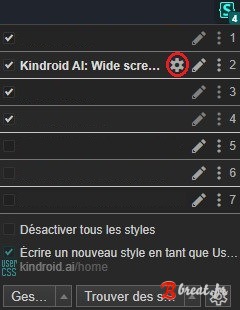
How do I access UserStyle customization options?
To access a UserStyle’s customization options, simply click here:
Can I modify a UserScript and UserStyle?
You are free to modify my UserStyles within the limits of the license I grant you, but I recommend doing so in a new UserStyle that you create yourself; otherwise, you will no longer receive my updates automatically.
In summary:
- AGPL 3.0 license: you may modify / copy / distribute partially or entirely provided that you include a link to my source code or my website AND that your project also uses the AGPL 3.0 license.
- BY-NC-ND license: you are strictly forbidden to modify / copy / distribute partially or entirely anything without my explicit authorization.
I can’t find my issue in the FAQ. What can I do?
Feel free to contact me in  French or
  English only via the links below:
- via comments on the presentation page of the relevant UserScript/UserStyle on breat.fr
- via the contact page
- by creating a ticket on my discord server from the project's overview page.
There are no stupid questions, and I will do my best to help you quickly and effectively.
Comments