Please disable your ad blocker.
The only ads on this site are discreet (sidebar on desktop, below the content on mobile).They do not interfere with reading and may even offer you benefits (discounts, free months…).
Final Fantasy XIV: How to create a macro?
Creating macros in Final Fantasy XIV can greatly improve your in-game efficiency and simplify repetitive actions. This detailed guide will teach you how to create a macro by including mandatory, recommended, and optional elements.
I will use the White Mage spell Raise as an example, but the process is identical for other spells.
Follow my step-by-step instructions to optimize your gameplay experience and become a macro expert.
Example
/macroicon Raise
/ac "Swiftcast" <t>
/wait 1.5
/ac "Raise" <t>
/wait 1
/em performs mouth-to-mouth resuscitation on <t>
/p bla bla
Line-by-line explanation
- /macroicon Raise: adds the Raise icon to the macro
- /ac "Swiftcast": casts the spell Swiftcast,
<t>refers to the target - /wait 1.5: pauses the macro for 1.5 seconds
- /ac "Raise"
<t>: casts Raise on the target - /wait 1: pauses the macro for 1 second
- /em performs mouth-to-mouth resuscitation on
<t>: adds an emote-style message to the chat (optional) - /p bla bla: sends a message in party chat to notify that you are casting Raise on a specific player (optional)
Different ways to target
<me>: targets your character<t>: targets your current target<tt>: targets the target of your target
Example with a 3-player party
Let’s imagine a 3-player party and the use of the Raise spell from my character BreatFR:
- BreatFR (me)
- Toto
- Titi
Yes, I didn’t put much effort into the names 😊.
With <me>: I will cast Raise on myself, even if I am targeting Toto or Titi.
With <t>: I will cast Raise on Toto if I am targeting Toto.
With <tt>: I will cast Raise on Titi if I am targeting Toto, who is targeting Titi.
These targeting options help avoid spamming party selection keys, reduce targeting mistakes, and save time.
Result
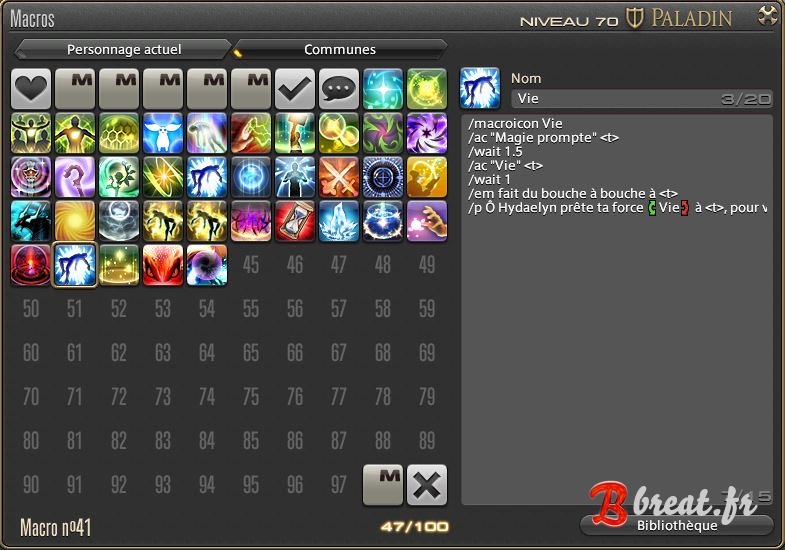
This is what your macro will look like:
Comments